Skip to content
FLIGHTCREWSIMAVIATION CONSULTING & FLIGHT TOOLS
FOR SIMULATION ONLYTraining tools for simulators such as MSFS, X-Plane and Prepar3D (P3D). Not for real-world flight operations.
A NEW TOOL · SEPARATE FROM THE EXCEL PRODUCT
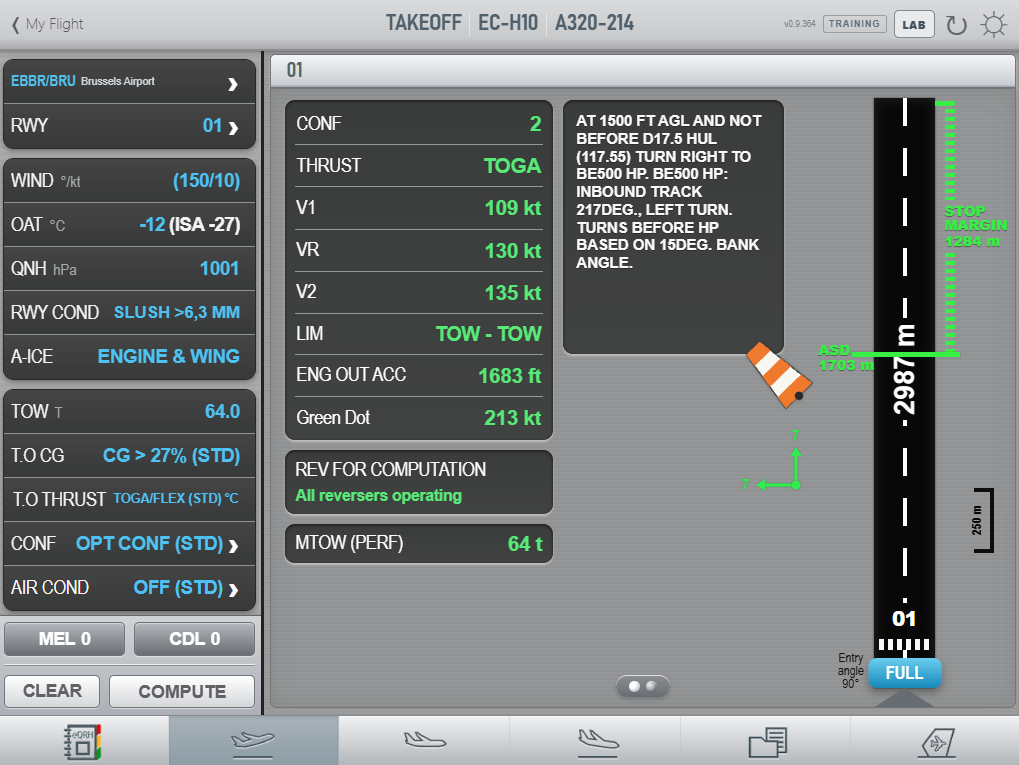
Screenshot of the browser-based A320 performance calculator A320 WEB APP · BETA
EXCLUSIVE BETAFREE FOR A LIMITED TIME
A320 PERFORMANCES · WEB APP

Discover the new A320 web calculator

Get exclusive early access to our new web project. This is not the Excel version: it runs directly in your browser, is optimised for tablets — especially iPad — and only needs an internet connection.

  • Proprietary performance dataset built using simulation references
  • Proprietary EOSIDs and runway/intersection data based on the integrated AIRAC cycle
  • Remaining A320 modules and a future B737 Web App are under development
RECOMMENDED VIEW Optimised for tablets (iPad and similar devices). Use landscape orientation: portrait phone screens may not display the interface correctly.

This free trial does not require purchasing the Excel tool. It is a separate project and is still in development.

A320 PERFORMANCES EXCEL TOOL · EXCEL VERSION
A320 / PERFORMANCE

A320 Performances Excel Tool

Microsoft Excel-based A320 performance tool for practising takeoff calculations in simulation environments.

A320 Performances Excel Tool
FEATURES

Training & performance

A320 takeoff calculations

  • TOGA and FLEX thrust selection.
  • Airports, runways and intersections using the included database.
  • V1, VR and V2 speeds.
  • Stop margins and takeoff limitations.

Feature availability depends on the version. Please test the DEMO before purchasing.

More informationTechnical details, requirements, updates and demo

Tool scope

The tool focuses on takeoff preparation, including speeds, margins, limitations and performance references based on the installed file version. Landing and weight-and-balance support may vary by version.

FOR SIMULATION USE ONLY

MOBILE / TABLET VERSION

Requirements:

  • Microsoft Excel app installed (Android/iOS)

Download v1.1 (DEMO):
Download FlySmart A320 DEMO

Important:

  • Before purchasing, make sure the DEMO version works correctly on the devices you normally use. You can download the DEMO here.
  • To open the file on tablets, Microsoft Excel Mobile is required.
  • Future updates can be downloaded free of charge from your customer account.

After completing your purchase, please check your SPAM folder if you do not receive the order confirmation email.